support-us@roborock.com
We'll get back to you within 1 business day.
1-855-960-4321
Helpline hours: 24/7, US only

1. Only the following models support QR code.
Roborock Q7 Max Series
Roborock Q7 Series
Roborock Q5 Series
Roborock S8 Series
Roborock Q Revo
Roborock Q5 Pro Series
Roborock Q8 Max Series
Other models don't support QR code.
2. I cannot find the QR code.
Some products do not have QR code. To add one of these devices, go to the Roborock app homepage and tap "Search for Device". Please tap on "No QR code found" and proceed with the next step. See picture below:
3. If I'm using the models that supports QR code, where's the QR code?
The QR code is located below the top cover or dustbin or on the top of the machine.
The following applies to S7maxV Ultra, S7Max Ultra, S8 Pro Ultra and Q Revo.
Wash frequency is 20 minutes by default, you can change it on wash settings page of the app. If needed, you can also start mop washing manually by pressing and holding Dock button when robot on the dock.
It depends on actual use. For reference, a full water tank is enough for 3-4 days usage to vacuum and mop a 100-square-meter house once a day, with default washing settings, i.e. 20 minutes mop wash frequency and balanced washing mode.
Its side brush, main brush, dustbin, filter, main brush, and brush cover are compatible with that of S7. Its water tank is not compatible with any of the previous models.
The following applies to S7, S7MaxV, S8 and S8 Pro Ultra.
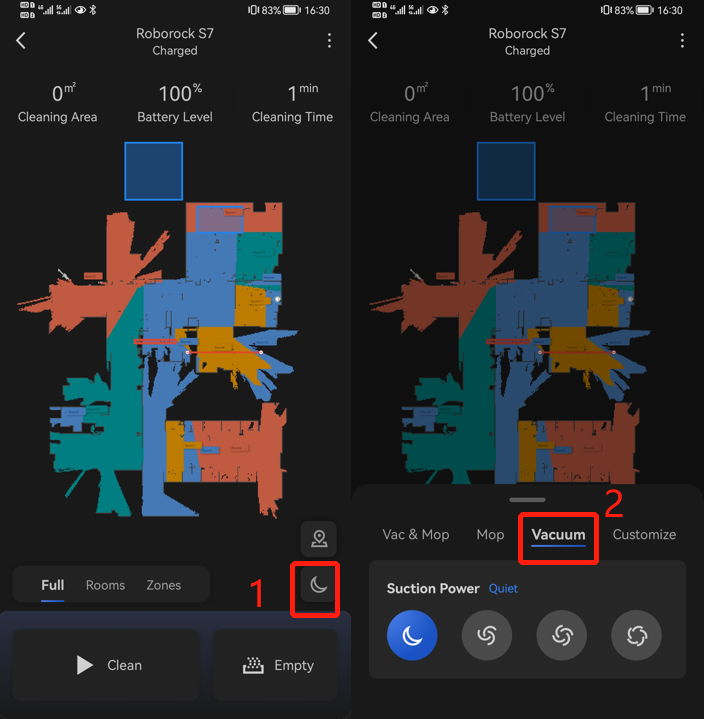
There are 2 ways to achieve that:
1) Please remove the water tank and then start cleaning
2)Choose Vacuum instard of Vac&Mop or Mop.
Note: The UI may change as firmware updates without prior notice.
The following applies to Roborock S7, S7MaxV, S7Max Ultra, S6MaxV, S8, S8+ and S8 Pro Ultra only.
There are two ways to turn on child lock.
Once the child lock is enabled, the device will not respond if any button is pressed until you disable the lock.
The following applies to S7, S7MaxV, S7Max Ultra, S8, S8+, S8 Pro Ultra and Q Revo only.
The device is equipped with ultrasonic carpet recognition. It can recognize carpet with extraordinary accuracy. You can choose different carpet modes according to your needs. For example, you can set the robot to lift its mop automatically when it detects carpet. That mode is recommended for short-pile carpet.
Here is the brief description for how to use it:
Below we take S7 as example. There may have slight difference due to different models and firmware versions.
For the first map, when robot is creating the first map, there are 4 requirements to meet:
For the 2-4 maps, please change building layout to multi-floor (for others: enable multi-floor maps feature) first and click “create new map”, and then "create", you don't need to move the charging dock together with the vacuum to the other floor. You just need to move the vacuum alone to map that floor. The vacuum will come back to the starting point where you let it start the cleaning, and store the new map.
After all maps are successfully created, you don't need to carry the charging dock with the vacuum to the other floor. Just move the vacuum alone, start the vacuum and it will recognize which floor it is, and use the corresponding map.
How many maps can robot cleaner save?
How do I reset saved cleaning map?
How do I merge or divide rooms on the map?
If the above materials do not help, contact us and we'll get back to you as soon as possible.
support-us@roborock.com
We'll get back to you within 1 business day.
1-855-960-4321
Helpline hours: 24/7, US only