support-us@roborock.com
We'll get back to you within 1 business day.
1-855-960-4321
Helpline hours: 24/7, US only

②5GHz:
1. Only the following models support QR code.
Roborock Q7 Max Series
Roborock Q7 Series
Roborock Q5 Series
Roborock S8 Series
Roborock Q Revo
Roborock Q5 Pro Series
Roborock Q8 Max Series
Other models don't support QR code.
2. I cannot find the QR code.
Some products do not have QR code. To add one of these devices, go to the Roborock app homepage and tap "Search for Device". Please tap on "No QR code found" and proceed with the next step. See picture below:
3. If I'm using the models that supports QR code, where's the QR code?
The QR code is located below the top cover or dustbin or on the top of the machine.
QRcode: Scan the QR code below to download and install the app:
App Store:
https://apps.apple.com/us/app/roborock/id1462875428
Google Play:
https://play.google.com/store/apps/details?id=com.roborock.smart&hl=en&gl=US
The following applied to all roborock products.
We do not recommend adding non-roborock cleaner into the water tank as bubbles created by the cleaner may block the filter. If you use roborock cleaner, please dilute it (dilution ratio 1:300) before using.
Mihome app user
Mihome app user:

Roborock app user:

Here is the brief description for how to use it:
Below we take S7 as example. There may have slight difference due to different models and firmware versions.
For the first map, when robot is creating the first map, there are 4 requirements to meet:
For the 2-4 maps, please change building layout to multi-floor (for others: enable multi-floor maps feature) first and click “create new map”, and then "create", you don't need to move the charging dock together with the vacuum to the other floor. You just need to move the vacuum alone to map that floor. The vacuum will come back to the starting point where you let it start the cleaning, and store the new map.
After all maps are successfully created, you don't need to carry the charging dock with the vacuum to the other floor. Just move the vacuum alone, start the vacuum and it will recognize which floor it is, and use the corresponding map.
How many maps can robot cleaner save?
How do I reset saved cleaning map?
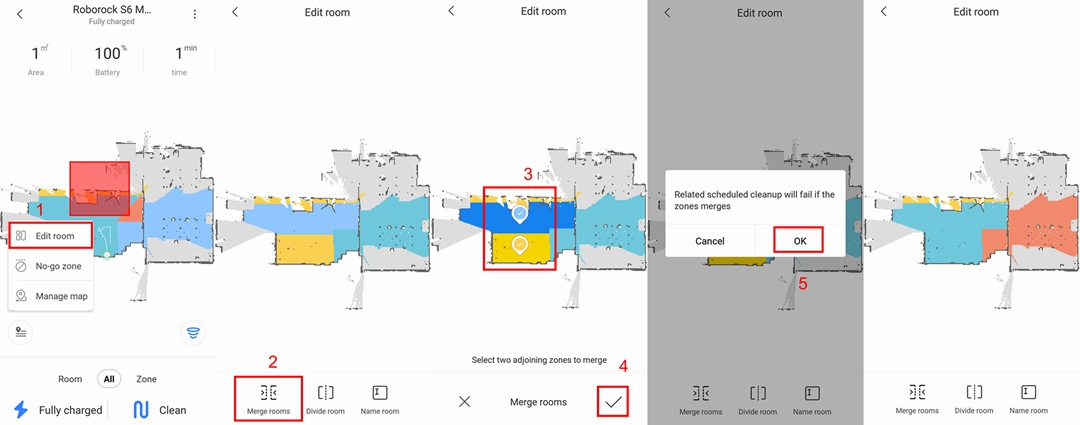
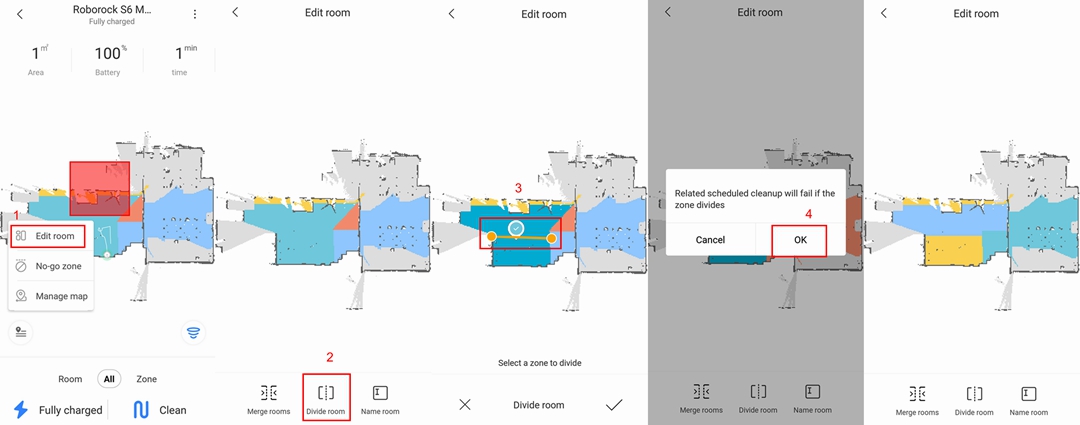
How do I merge or divide rooms on the map?
You can check below table for more information.

How long does it take to charge the Roborock H6?
Does continually connecting the machine to the charger or charging stand damage the battery?
Should I unplug the dock charger when the robot cleaner is fully-charged?
Why does the vacuum indicate “Low Battery Charge Soon”?
Why is the battery not full even after charging for a long time?
The climbing ability of all the products, except S4 is 2cm (0.79inch), including S6 MaxV, S6 Pure, S6, S6 Max, S5, E4, E2/E3, C1, while the S4 is 1.5 cm (0.59inch).
When robot is creating the first map.
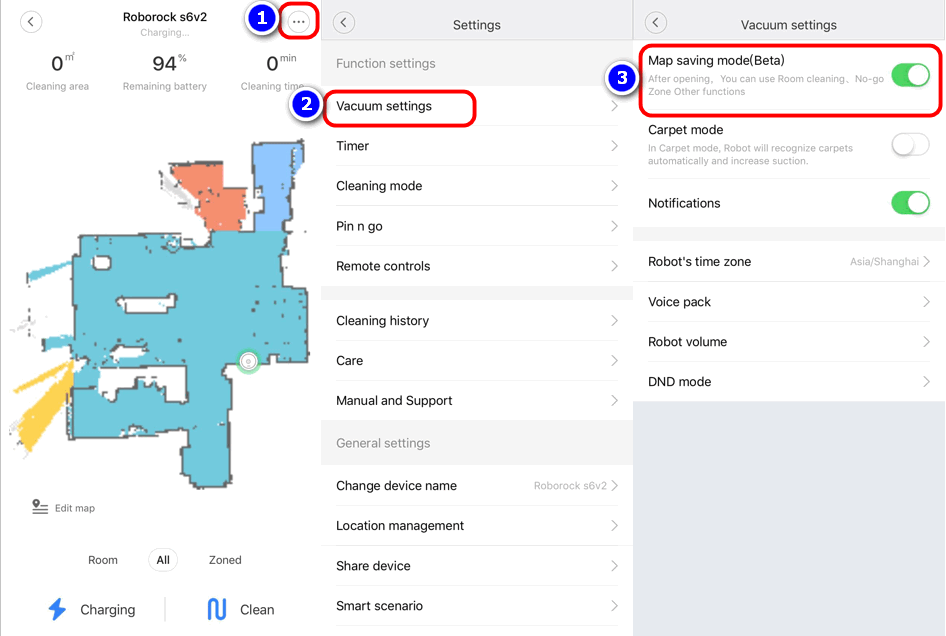
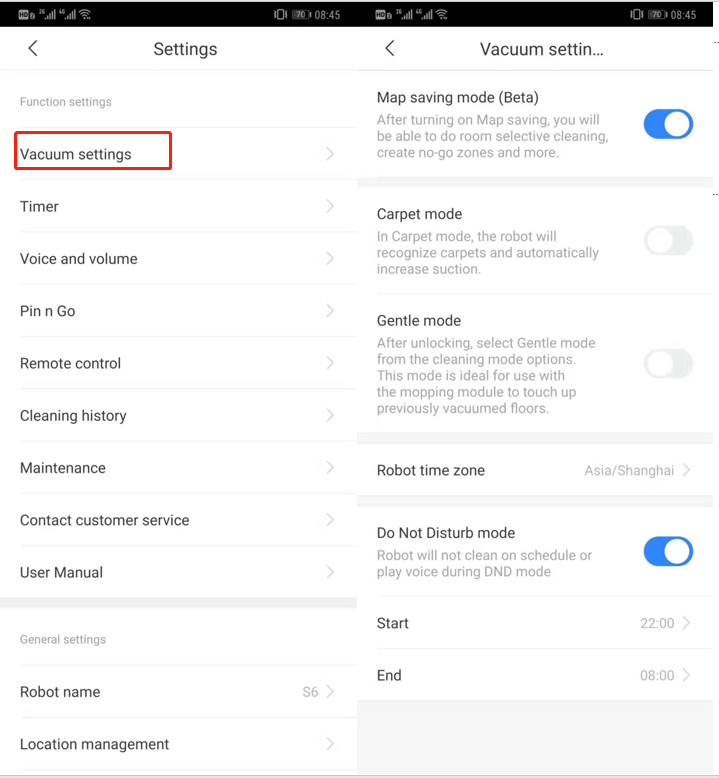
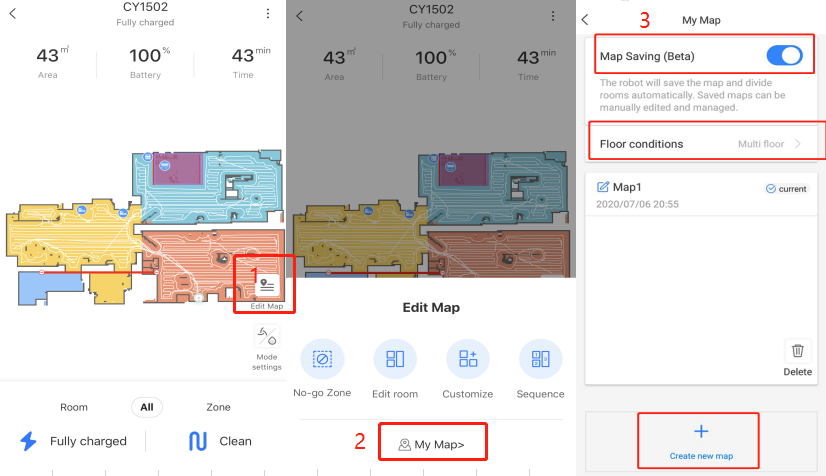
1. Map saved mode is enabled.You can go to "Vacuum settings" page or "Edit map" page.
2. Robot starts from dock.
3. Robot goes everywhere on map it detects to clean, not just somewhere. Pls make sure the doors are open for the rooms you want to be displayed on map.
4. Robot returns to dock(whose position is not moved) by itself and successfully.
MI ID A: Owner of device
MI ID B: Who wants to have device from owner.
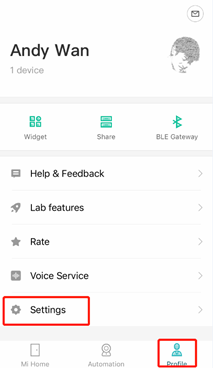
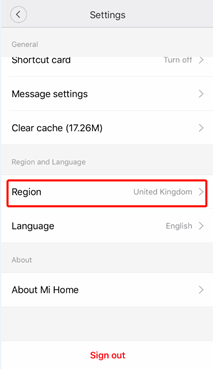
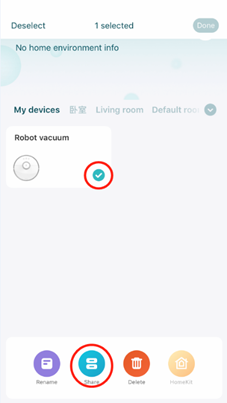
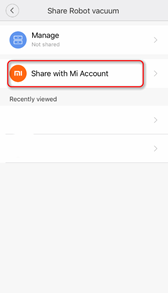
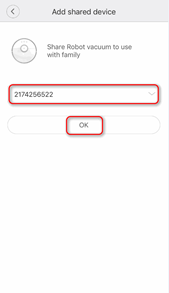
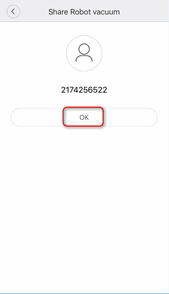
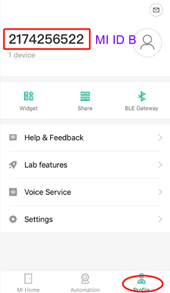
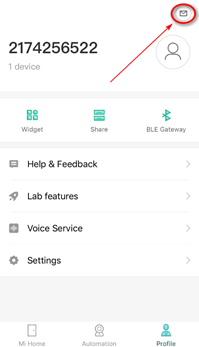
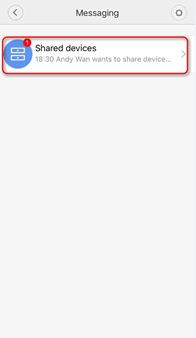
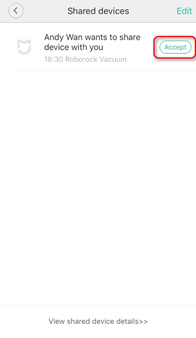
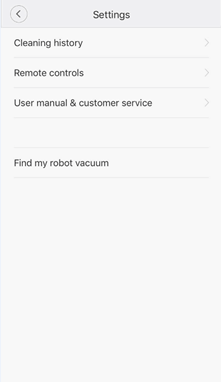
But please notice the shared function is designed to just allow some basic features to be used by account shared. If MI ID B needs the whole features of device, we suggest he uses the owner's Mi account as one Mi account could be signed in on multiple phones.
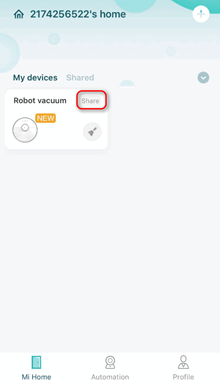
Can multiple people control the robot by using different Mi accounts?
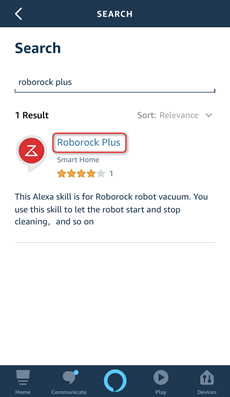
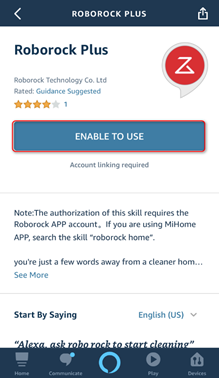
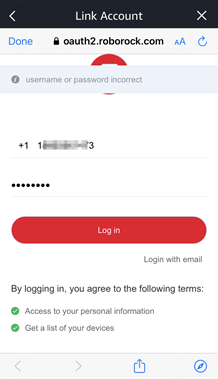
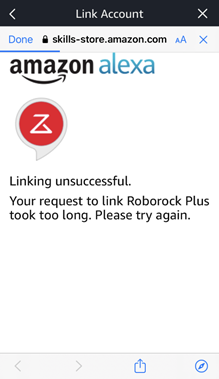
Roboorck Plus is a skill that will allow users to bind their Roboorck ID to the Amazon Alexa. After account linked, users will be able to control the Roborock devices via Alexa.
Note: Make sure your robot is added and online on Roborock app (not Mi Home) first.
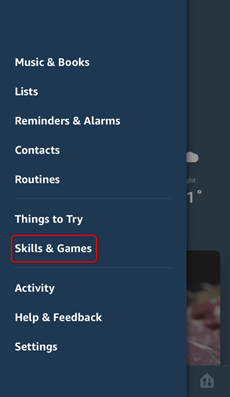
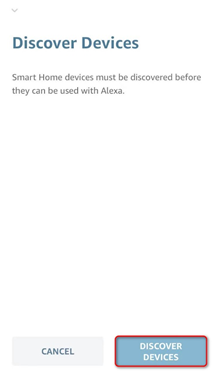
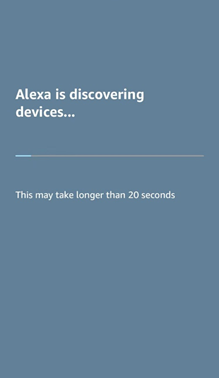
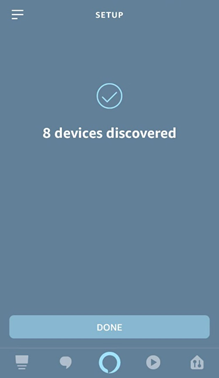
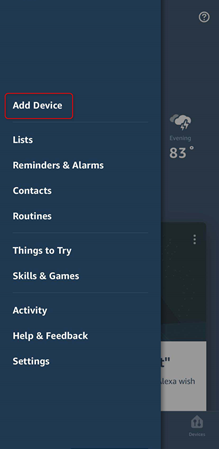
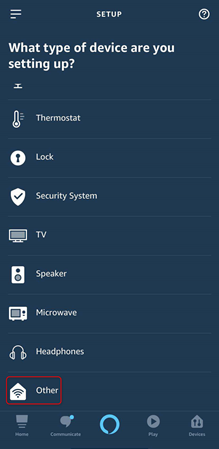
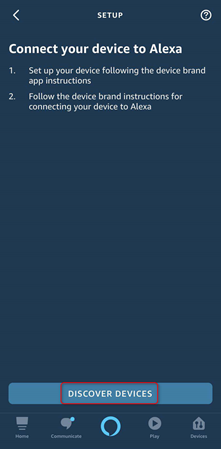
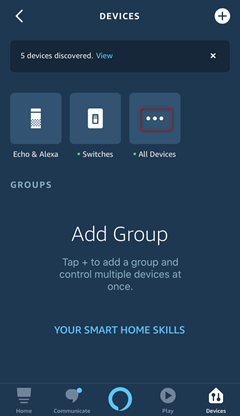
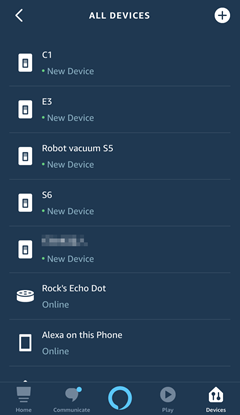
How do I connect robot vacuum to alexa via skill Roborock Home or Mi Home?
How do I connect robot vacuum to Google Home?
How to connect Roborock to Mi Home on an Android device?
How do I connect my robot cleaner to Roborock app on an iOS device?
How do I connect my robot cleaner to Roborock app on an Android device?
Why cannot my robot cleaner work under China region of Mi Home app?
Roborock Home is a skill that will allow users to bind their Mi ID to the Alexa. After account linked, users will be able to control the Roborock devices via Alexa.
Note: Make sure your robot is added and online on Mi Home app first.
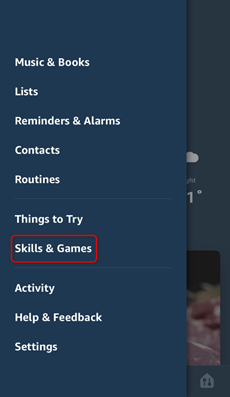
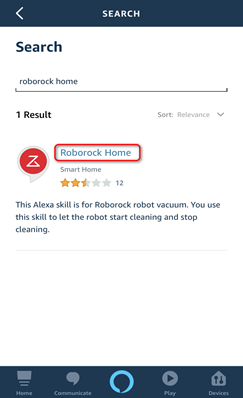
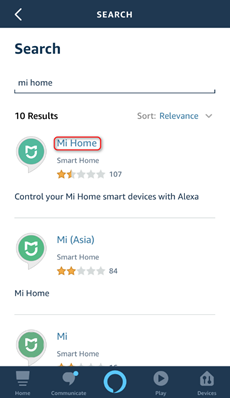
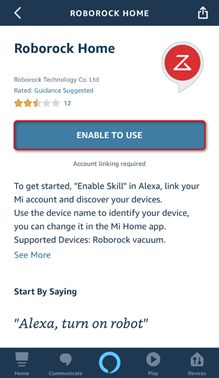
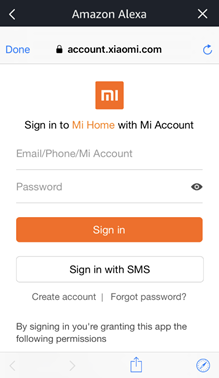
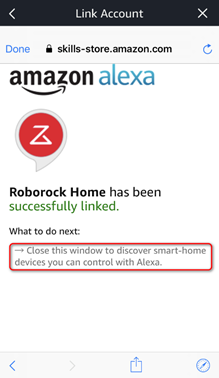
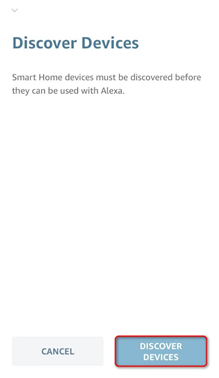
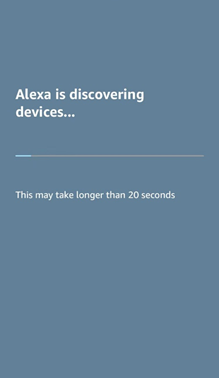
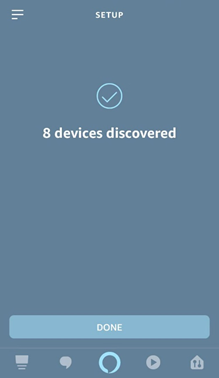
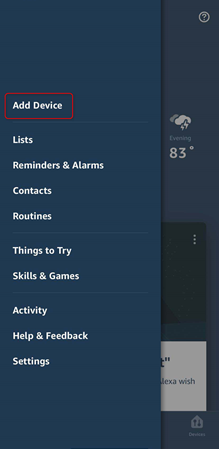
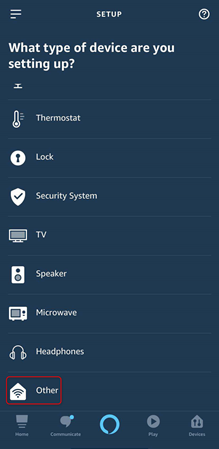
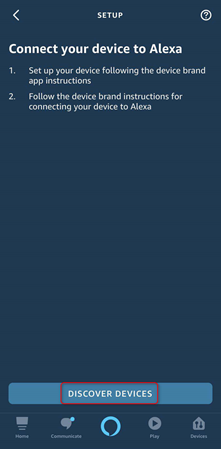
Note: At present, Alexa smart speaker could only start and stop robot by skill Roborock Home or Mi Home.
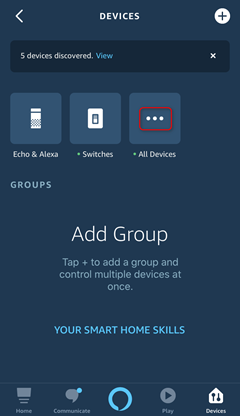
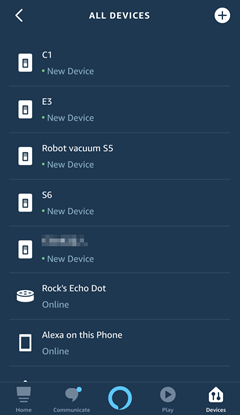
How do I connect robot vacuum to alexa via skill Roborock Plus?
How do I connect robot vacuum to Google Home?
How to connect Roborock to Mi Home on an Android device?
How do I connect my robot cleaner to Roborock app on an iOS device?
How do I connect my robot cleaner to Roborock app on an Android device?
Why cannot my robot cleaner work under China region of Mi Home app?
You could set schedule cleaning on app. See picture below: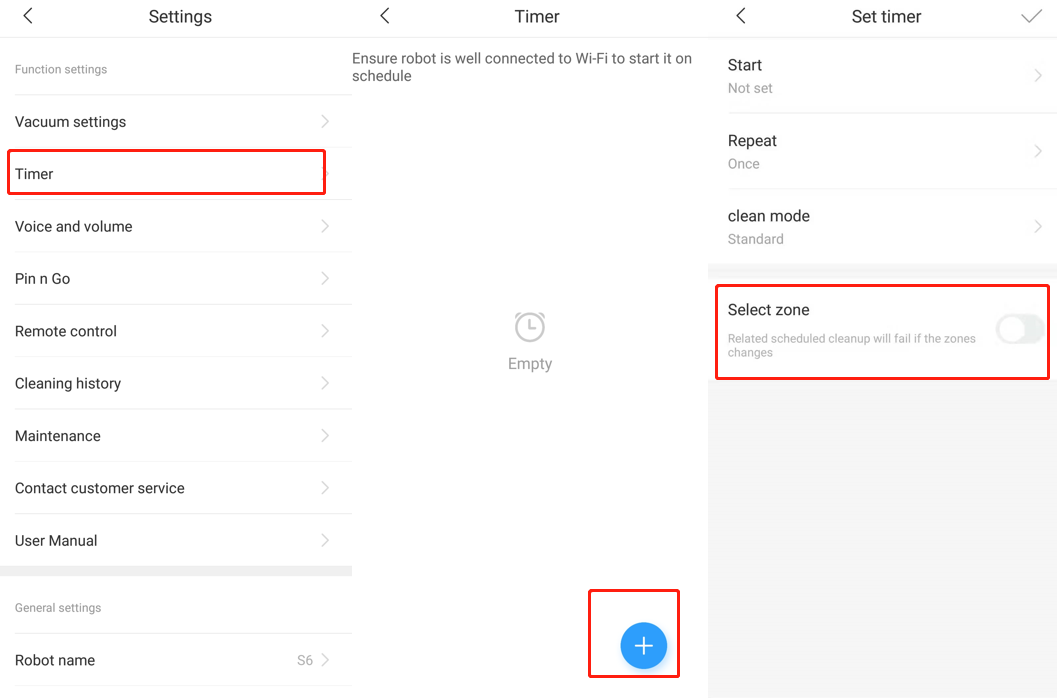
How do I set schedule cleaning for Roborock E series?
Why does S6 MaxV not support scheduled room cleaning anymore?
Will Roborock robot support scheduled room cleaning with multi-floor maps feature enabled?
Step 1. Hold the home icon button for 3-5 seconds.
Step 2. Use a pin to press the reset button next to wifi LED just once, and power button, home button and spot cleaning button's light will be out. When you are doing this, please make sure home button is still under your finger's holding without moving.
Step 3. Keep holding home button for 5 seconds after you press reset button until power button blinks again and you hear the tone "Restoring the initial version. It will take about five minutes. Please wait patient", and then you could remove the finger.
Notice:
1. Factory default restore will disconnect RoboVac from wifi. Please re-add it after factory default restore.
2. Factory default restore will also make RoboVac's firmware version come back to original one when it was made in factory. After factory default restore, you could go to RoboVac's setting--general setting--check for updates to upgrade its firmware to latest one.
3. Factory default restore will delete all your setting on device like scheduled cleaning.
4. Factory default restore will delete every single cleaning's log including every cleaning's duration, size and map. But the total duration, total times of cleaning and total size will be still kept there.
Standard dock can operate between 100 V-240 V AC (Volts Alternating Current).
Auto-Empty Dock (or any dock with emptying function) works as follows:
US version: 100V-120V
EU version: 220V-240V
AU version: 220V-240V
JP version: 100V-127V
KR version: 220V-240V
TW version: 100V-127V
RU version: 220V-240V
UK version: 220V-240V
Check your regional voltage before use.
|
Yes. Onboard cliff sensors will detect any drops and prevent the robot from falling.
Related FAQ:What is the maximum height of a threshold that Roborock can pass over? |
Notes:
a. Make sure your phone is already connected to Wi-Fi;
b. Open the top of your cleaner to see the Wi-Fi indicator light during the connection process.
Related FAQ:
How do I connect my robot cleaner to Roborock app on an iOS device?
How to connect Roborock to Mi Home on an Android device?
How to connect Roborock to Mi Home on an iOS device?
Notes:
a. Make sure your phone is already connected to Wi-Fi;
b. Open the top of your cleaner to see the Wi-Fi indicator light during the connection process.
Note:
The Wi-Fi indicator on the top of your vacuum will go from flashing to solid if it has connected successfully.
Related FAQ:
How do I connect my robot cleaner to Roborock app on an Android device?
How to connect Roborock to Mi Home on an Android device?
How to connect Roborock to Mi Home on an iOS device?
a. Make sure your phone is already connected to Wi-Fi;
b. Open the top of your cleaner to see the Wi-Fi indicator light during the connection process.
3.3.2.1 Select your device’s model from the “Home appliance” category.
3.3.2.2 Tick “Operation confirmed”.
Related FAQ:
How to connect Roborock to Mi Home on an iOS device?
How do I connect my robot cleaner to Roborock app on an iOS device?
How do I connect my robot cleaner to Roborock app on an Android device?
How do I connect robot vacuum to Amazon Alexa via Roborock Home or Mi Home?
How do I connect robot vacuum to alexa via skill Roborock Plus?
Notes:
a. Make sure your phone is already connected to Wi-Fi;
b. Open the top of your cleaner to see the Wi-Fi indicator light during the connection process.
Note:
The Wi-Fi indicator on the top of your vacuum will go from flashing to solid if it has connected successfully.
Related FAQ:
How to connect Roborock to Mi Home on an Android device?
How do I connect my robot cleaner to Roborock app on an iOS device?
How do I connect my robot cleaner to Roborock app on an Android device?
How do I connect robot vacuum to Amazon Alexa via Roborock Home or Mi Home?
How do I connect robot vacuum to alexa via skill Roborock Plus?
How do I connect robot vacuum to Google Home?
Why cannot my robot cleaner work under China region of Mi Home app?
| We are sorry to tell you that your device is Chinese mainland version which could only be accessed on app in China mainland. We set this limitation because we have to comply with local country laws. We have already informed all our distributors this rule. Sorry for that and hope you can understand and forgive it. In this situation, we suggest you contact the seller to get a solution. |
| We are sorry to tell you that your vacuum cleaner is Non-Chinese version and can't work together with your other Mi devices with Chinese version under China Mainland server. This is because we have to comply with local country laws that device's data could not be saved in a server in China. Sorry for that and hope you can understand and forgive it. |
|
The model S6, S4 and S5 Max could save 3 maps. But they are not the maps for different floors. Only with multi-floor feature supported and enabled, can you create maps for different floors. (Take a quiz to know which Roborock for you) Recently, the latest firmware with multi-floor maps feature supported has been released for S5 Max and S6 in the Roborock app. If you customers need this feature, you can install the Roborock app to have a try. For other models, you can contact our technical support or check the firmware update on the APP to get further information.
Related FAQs:How many maps can Roborock S5 save? How to create multiple maps for multi-level house? How do I reset saved cleaning map? Can I make the robot cleaner clean specific rooms? |
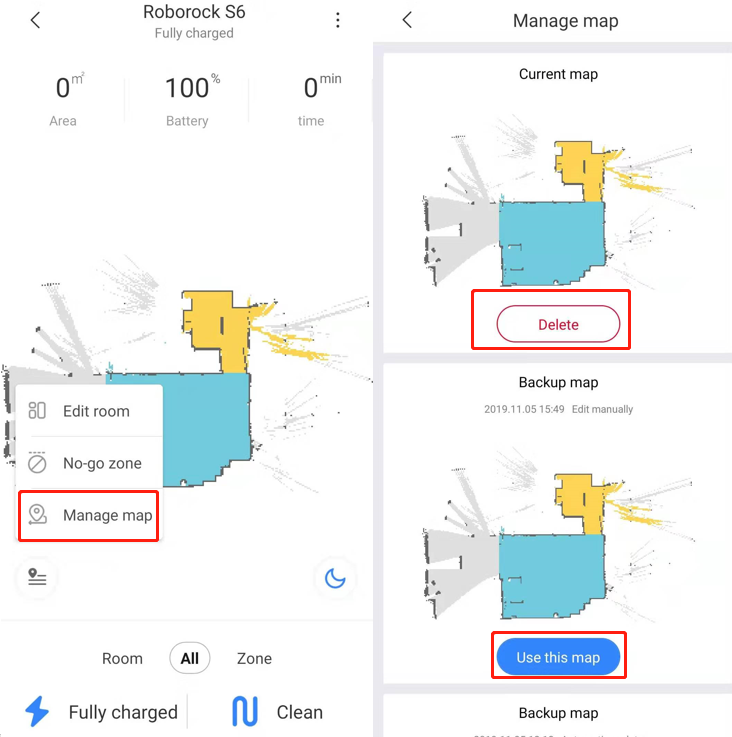
| You could reset map like picture below to get a new map on app. |
How many maps can robot cleaner save?
How to create multiple maps for multi-level house?
Can I make the robot cleaner clean specific rooms?
|
You could merge or divide rooms by editting map. See pictures below.
Related FAQs:How many maps can robot cleaner save? How to create multiple maps for multi-level house? Can I make the robot cleaner clean specific rooms? |
|
Carpet boost mode means device will auto increase suction strength to max when it is on carpet to vacuum stuff better. The brush could recognize carpet by feeling its resistance increased, comparing to hardwood or tile. The suction strength will recover to normal on hard floor when resistance decreases.
Related FAQs:Why does robot cleanner refuse to clean the shag carpet? Why does robot cleanner refuse to clean the dark carpet? |
|
Usually, we suggest customers put device on dock all the time if it is used every week. After battery is fully charged, only mother board of device is charged and customers don't need worry battery is fully charged for a long time and may decrease the lifespan. Besides, the device will turn off auto without any operation after 24 hours if it is not on dock and customers have to manually hold power button to turn on it, which is not convenient if it is often used. Of course, we still suggest customers turn off device if it will not be used for several months.
Related FAQ:Does continually connecting the machine to the charger or charging stand damage the battery? What should I do when the robot cleaner cannot find its dock? How long does Roborock take to get fully charged? Why is the battery not full even after charging for a long time? |
|
Yes. Mi Home app supports the feature. You could use your phone to control the robot cleaner. It applies to all products. Roborock app has this feature, which applies to S4, S5 Max, S6, S6 Pure, S6 MaxV and S4 Max, and S7. |
|
We are sorry to tell you the device could not recognize the carpet and leave it away with mopping module installed. I'm afraid you need uninstall the mopping module before it cleans the carpet.
Related FAQs:Why does robot cleanner refuse to clean the shag carpet? Why does robot cleanner refuse to clean the dark carpet? Why isn't Carpet Boost activated on carpets? Can I add cleaner into the water tank when moppings? What's the meaning of carpet boost mode in robot cleaner's setting? |
|
No. We recommend adding water into it regularly.
Related FAQs:Will I receive an alert when the dustbin is full? Can I add cleaner into the water tank when moppings? What should I do when there is little water leaking from tank and mopping cloth is almost dry? |
|
We are sorry to tell you that our products do not alert when a dustbin is full, only when it has not been emptied for an extended period. We recommend emptying the dustbin regularly.
Related FAQs:Will I receive an alert when the water tank is empty? What does "MAX" on the transparent dust bin mean?
Related Tutorials Video:Roborock S6 Emptying and Cleaning the Dustbin Roborock S5 Emptying and Cleaning the Dustbin |
|
No. We suggest others use the owner's app account as one account could be signed in on multiple phones at the same time.
Related FAQ: |
|
Yes. Enable map saving mode and simply tap on the room you want cleaned in the app and the robot will clean that room. See picture below.
Related FAQs:How to create multiple maps for multi-level house? |
|
Yes. The robot cleaner work without Wi-Fi and can carry out full-home cleanups, spot cleanups, and return to the dock with the push of a button. Connecting to Wi-Fi enables advanced features including scheduled cleaning, suction power strength selection, and more. |
If the above materials do not help, contact us and we'll get back to you as soon as possible.
support-us@roborock.com
We'll get back to you within 1 business day.
1-855-960-4321
Helpline hours: 24/7, US only