support-us@roborock.com
We'll get back to you within 1 business day.
1-855-960-4321
Helpline hours: 24/7, US only

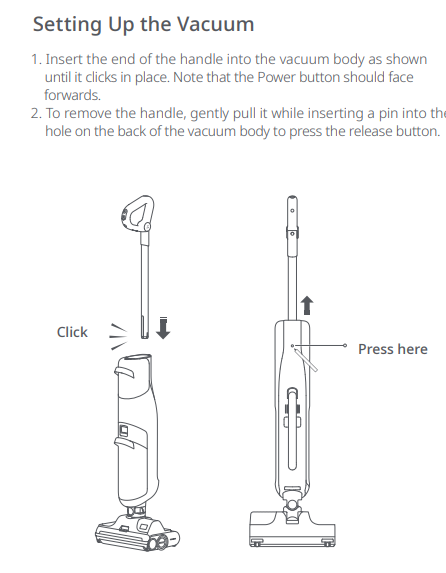
It could be the handle is not inserted properly. Please refer to user manual to reinsert the handle.
Please remove the front roller, clean the dirt detection sensor on its front right side, and try again. See attached picture.
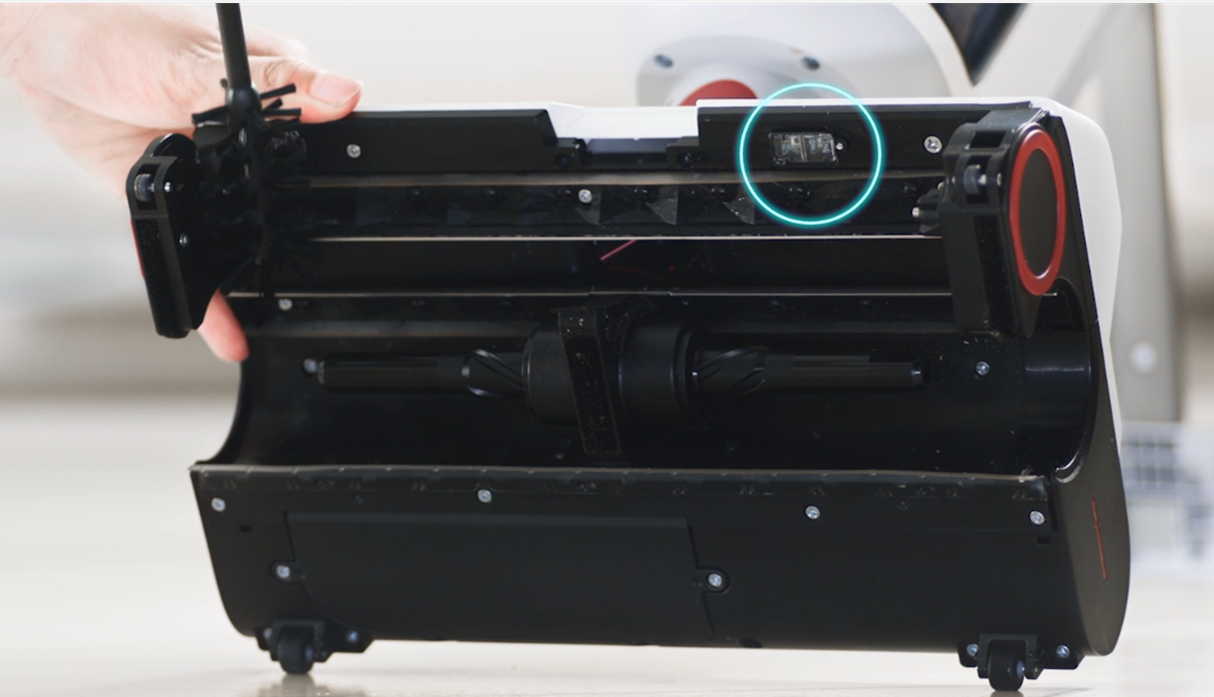
The dirt indicator is based on infrared light detection, and its performance may vary according to different types of stains. Sensor detection is for reference only.
If the device displays E0, E1... on screen, please press and hold Power button for 5 seconds to force restart the device and then try again. If the issue persists, please contact Customer Support.
Please make sure the device is in charging mode. When the device is placed on the charging dock securely, it will report "charging".
Since the device leaves few water stains on the ground, you may not notice that the device is releasing water. Please try a round of self-cleaning with an empty dirty water tank. After that, please check if the water level in the tank goes up or not. If it does, it means the water flow is fine.
Please remove the rollers to check blockages, and install the rollers properly to try again. If the issue persists, please contact Customer Support.
If the above materials do not help, contact us and we'll get back to you as soon as possible.
support-us@roborock.com
We'll get back to you within 1 business day.
1-855-960-4321
Helpline hours: 24/7, US only