support-us@roborock.com
We'll get back to you within 1 business day.
1-855-960-4321
Helpline hours: 24/7, US only

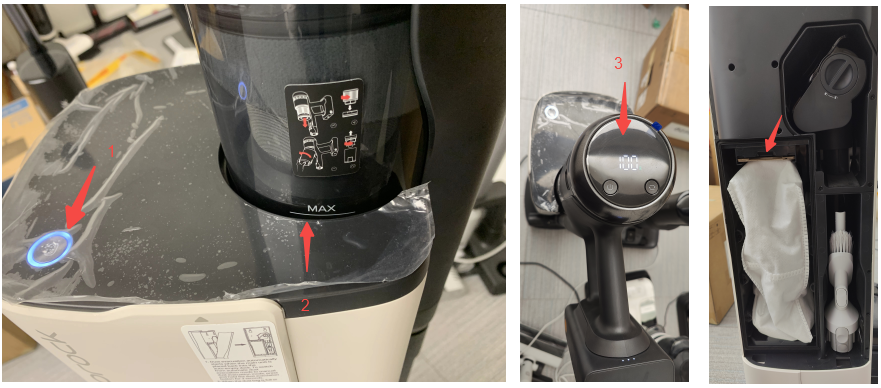
The dock station will only activate if both the dustbag and the device are correctly in place. If they are not, pressing the Empty button (see No.1 in the picture) will have no response. Please check the following:
1. Place the device onto the dock until you hear a “click.”
2. Ensure the Max line on the device is slightly below or level with the top surface of the dock station.
3. Confirm the device’s screen display lights up. (Note: On H60 models, the display has no numbers.)
4. Reinstall the dustbag to ensure it is properly seated.
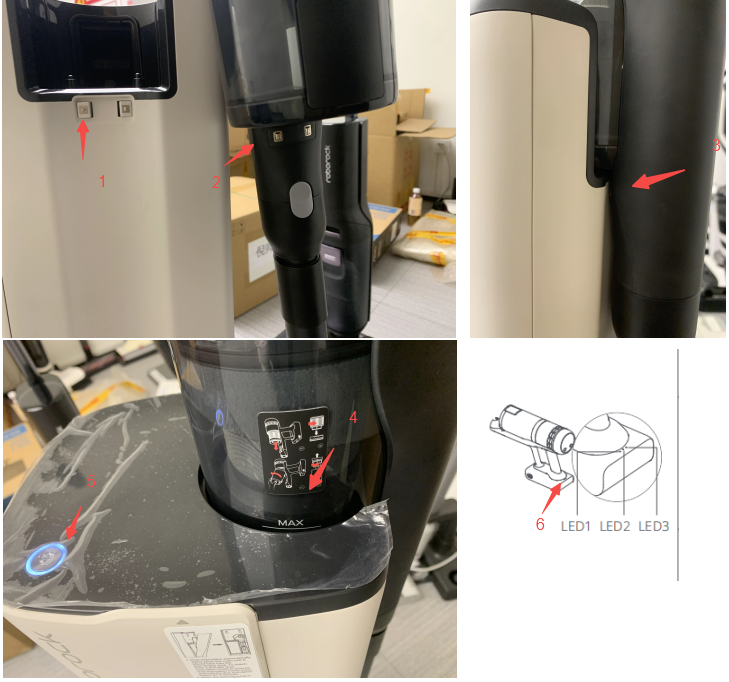
Please try the following to see if that helps.
1. Check the charging contacts
Inspect the charging contacts on both the dock and the main unit(see No.1 & No.2 in the picture). If they appear dirty, corroded, or worn, please clean them with a dry cotton swab and ensure they are clean and dry.
2. Confirm correct placement
Place the main unit securely on the charging dock. Check the areas marked No.3 & No.4 in the picture to confirm the main unit is properly aligned with the dock.
3. Verify power supply
Ensure the power adapter is firmly connected to the dock and power outlet. Press the button on the dock (see No.5); the indicator should light up if power is connected.
4. Allow sufficient charging time
Leave the main unit on the dock to see if the battery level increases. A full charge typically takes about 3.5 hours.
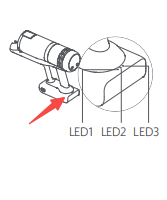
5. During charging or operation, check if the battery status indicators (LED1, LED2, LED3) are blinking.
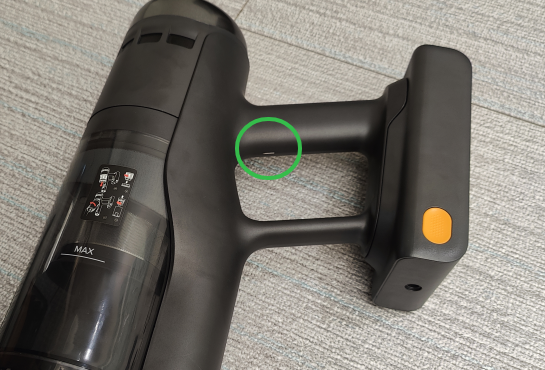
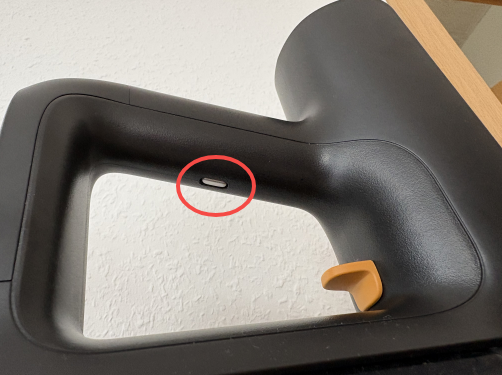
The dustbin uses a cyclone separation design. During operation, dust continuously rotates inside the dustbin, which can cause static electricity buildup.
To prevent sudden static discharge, the handle is equipped with an Anti-Static Point, see attached picture. Please ensure your hand maintains proper contact with the Anti-Static Point during use. This allows accumulated static inside the dustbin to safely dissipate, reducing the chance of feeling a static shock.
When vacuuming larger particles with the device, dust or debris may flow back toward the brush head when the vacuum stops, especially when using a long wand.
For larger particles, keep the vacuum running for about 5 seconds after the debris is picked up before stopping. You can also use Max mode to increase suction and help ensure larger particles are fully collected.
If the issue persists, check the following:
1. Dust Bin: Detach the dust bin, empty it, and wipe the inside with a dry cloth or tissue to ensure no dust affects the seal. Do not rinse the main unit or dust bin with water, as they contain electronic components.
2. Cyclone Assembly & Bottom Cover: Detach the cyclone assembly and check for blockages. Reinstall the assembly and make sure the dust bin bottom cover is fully secured. An improperly secured bottom cover may allow debris to escape.
3. Brush Head & Air Path: Check the brush head and connected air path for blockages and ensure the airflow path is clear.
What you will check in this video: https://youtube.com/shorts/2oo4Jc2acn8
The robot has three Battery Status Indicators (LED1, LED2, LED3).
LED1 flashing white during use
This usually means the battery level is low. Please charge the robot before use. A full charge typically takes about 3.5 hours.
LED2 flashing red quickly during use
Possible causes:
• Airway obstructed: Check if the dustbin, telescopic wand, or cleaner head is clogged and clear any debris.
• Cleaner head blocked: Clear any foreign objects entangled in the cleaner head.
Battery runtime varies depending on the cleaning mode and attachment used. Higher suction modes will reduce runtime.
Please refer to the expected runtimes below under normal operating conditions:
· Multi-surface brush: 45 min (ECO) / 25 min (MED) / 8 min (MAX)
· 2-in-1 cleaning head: 60 min (ECO) / 28 min (MED) / 10 min (MAX)
· Motorized mini-brush: 55 min (ECO) / 25 min (MED) / 10 min (MAX)
To check battery performance:
Fully charge the vacuum.
Use the attachment and suction mode you want to test.
Run the device until the battery is low or depleted.
Record the runtime and compare it with the expected values above.
Notes:
If the runtime is close to the expected range, the battery is considered to be functioning normally.
This test will help us determine whether the battery performance is within normal expectations.
If the above materials do not help, contact us and we'll get back to you as soon as possible.
support-us@roborock.com
We'll get back to you within 1 business day.
1-855-960-4321
Helpline hours: 24/7, US only